如何查詢電腦上的藍芽接收器(bluetooth dongle)的藍芽版本
藍芽在現代的眼光來說,已經是一個3C設備的低頻輸入輸出設備的標準連接協定,舉凡鍵盤、滑鼠、喇叭、麥克風...皆有其應用的市場,這篇文章要教你怎麼查詢在筆記型電腦內建的藍芽、或者是桌上型電腦主機板內建的藍芽(或透過USB擴充的藍芽接收器)的藍芽版本號。(越高版本號的藍芽當然可以用更高的速率連接更先進的設備)
查詢電腦上藍芽的版本
Step 1. 「Windows + X」>裝置管理員,並尋找到下圖類似「Generic Bluetooth Radio」字眼,點選右鍵選擇內容。
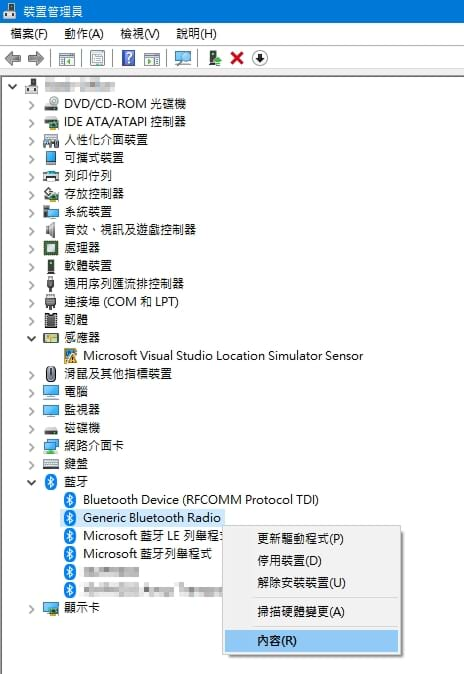
Step 2. 點選進階頁籤,查看韌體版本後面的LMP字眼(Link Manager Protocol)並觀察其數值。
| LMP | 藍芽版本 |
|---|---|
| 0.X | Bluetooth 1.0b |
| 1.X | Bluetooth 1.1 |
| 2.X | Bluetooth 1.2 |
| 3.X | Bluetooth 2.0 + EDR |
| 4.X | Bluetooth 2.1 + EDR |
| 5.X | Bluetooth 3.0 + HS |
| 6.X | Bluetooth 4.0 |
| 7.X | Bluetooth 4.1 |
| 8.X | Bluetooth 4.2 |
| 9.X | Bluetooth 5.0 |
| 10.X | Bluetooth 5.1 |
| 11.X | Bluetooth 5.2 |
| 12.X | Bluetooth 5.3 |
| 13.X | Bluetooth 5.4 |
| 14.X | Bluetooth 6.0 |
舉例來說:
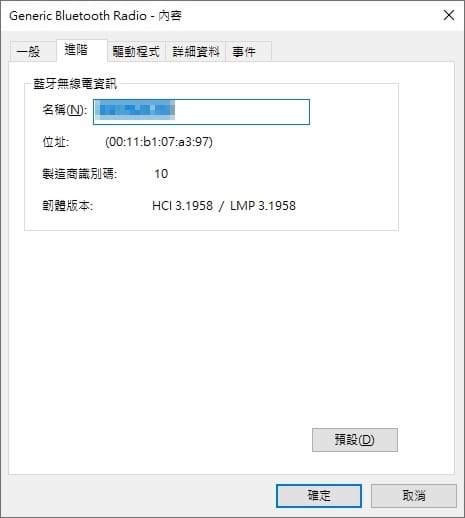
↑這個設備的LMP是3開頭,所以它是「Bluetooth 2.0 + EDR」。
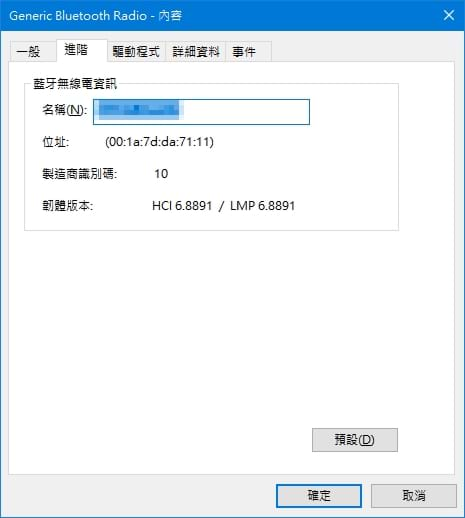
↑這個設備的LMP是6開頭,所以它是「Bluetooth 4.0」。